
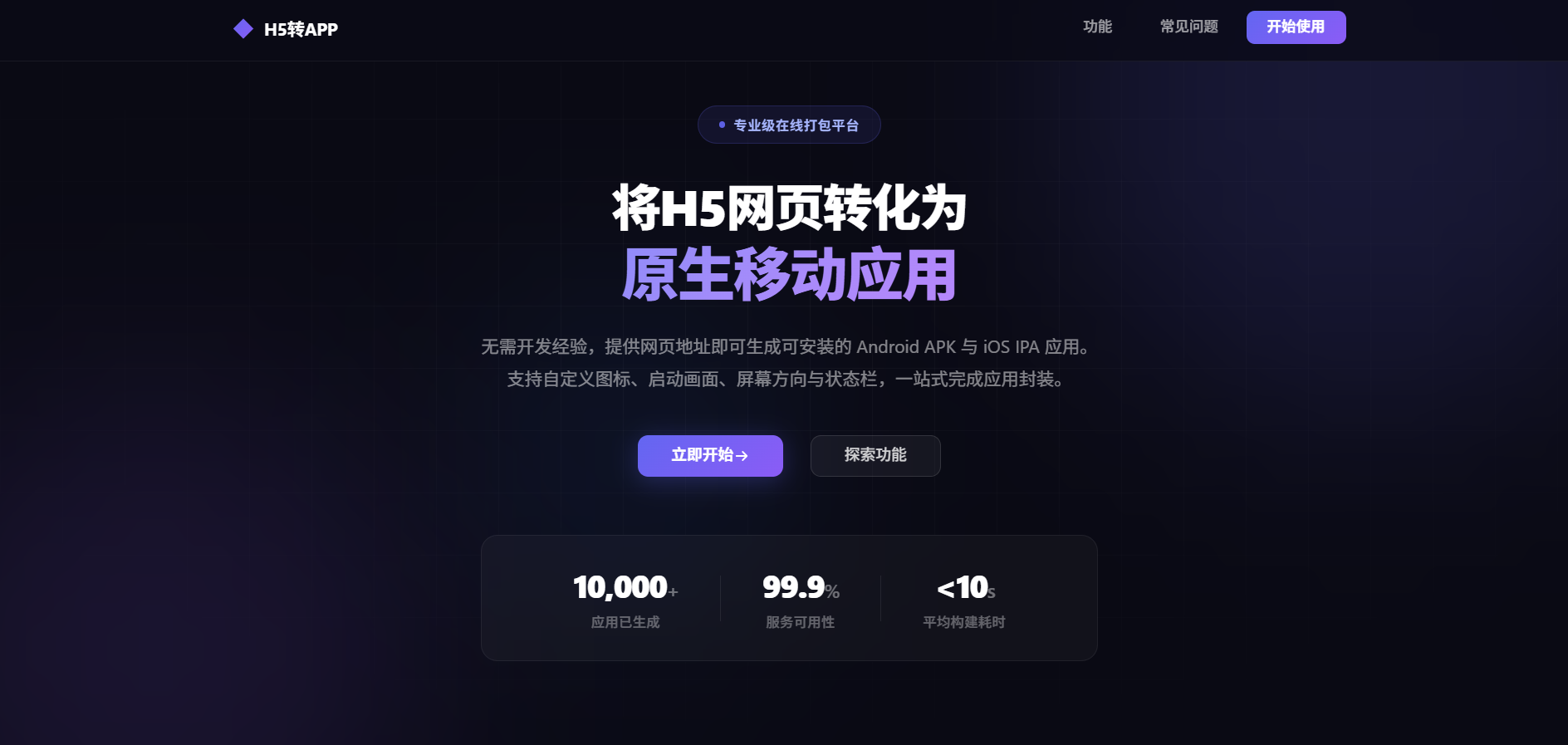
H5转APP打包系统
宝塔面板部署教程(超详细版)— 零基础也能轻松部署
🛠️ 技术栈介绍
前端技术栈
| 技术 | 版本 | 说明 |
|---|---|---|
| Vue.js | 3.x | 前端框架,负责页面渲染和交互 |
| Vite | 5.x | 前端构建工具,用于编译打包前端代码 |
| Element Plus | 2.x | UI 组件库,提供按钮、表格、表单等界面组件 |
| Vue Router | 4.x | 前端路由,管理页面跳转 |
| Axios | 1.x | HTTP 请求库,用于调用后端 API |
后端技术栈
| 技术 | 版本 | 说明 |
|---|---|---|
| Node.js | 16.x | JavaScript 运行环境,后端程序运行的基础 |
| Express | 4.x | Web 框架,处理 HTTP 请求和路由 |
| MySQL | 5.7 / 8.0 | 关系型数据库,存储用户、项目、构建记录等数据 |
| mysql2 | 3.x | MySQL 驱动,用于 Node.js 连接 MySQL 数据库 |
| JWT (jsonwebtoken) | 9.x | 用户身份认证,生成和验证登录 Token |
| Multer | 1.x | 文件上传中间件,处理图标、启动页等文件上传 |
| Sharp | 0.33.x | 图片处理库,自动裁剪适配不同分辨率的图标 |
| JSZip | 3.x | ZIP 文件处理,用于 Android APK 资源合并 |
| Nitron | 1.2.x | Android APK 打包工具,生成可安装的 APK 文件 |
| apktool | 2.x | Android APK 反编译/重打包工具(需要 Java 环境) |
| uber-apk-signer | 1.x | APK 签名工具,对打包后的 APK 进行正式签名 |
| ldid | - | iOS 应用签名工具(IPA 打包需要) |
运维工具
| 工具 | 说明 |
|---|---|
| 宝塔面板 (BT Panel) | 可视化服务器管理面板,简化部署操作 |
| Nginx | Web 服务器,做反向代理和静态文件服务 |
| PM2 | Node.js 进程管理器,保证服务持续运行、崩溃自动重启、开机自启 |
| Java 8 (OpenJDK) | Android APK 打包工具 apktool 的运行依赖 |
项目架构图
用户浏览器
    │
    ▼
┌─────────────┐
│   Nginx     │ ← 80/443 端口,处理静态文件和反向代理
│  (反向代理)  │
└──────┬──────┘
       │
       ├──── 静态文件 ──── /www/wwwroot/h5-to-app/web/dist/ (Vue 前端)
       │
       └──── /api/* ────── Node.js (Express) 后端 :3000
                              │
                              ├── MySQL 数据库 :3306
                              ├── 文件上传 (uploads/)
                              ├── APK 打包 (builds/)
                              │    ├── apktool (需要 Java)
                              │    ├── uber-apk-signer
                              │    └── nitron
                              └── IPA 打包 (builds/)
                                   └── ldid (iOS 签名)
📑 目录
一、服务器要求
在开始之前,你需要一台云服务器。以下是最低配置要求:
| 项目 | 最低要求 | 推荐配置 |
|---|---|---|
| 操作系统 | CentOS 7.x / Ubuntu 20.04 / Debian 10 | CentOS 7.9 / Ubuntu 20.04 |
| CPU | 1 核 | 2 核及以上 |
| 内存 | 1 GB | 2 GB 及以上(打包APK需要内存) |
| 硬盘 | 20 GB | 40 GB 及以上(存放构建产物) |
| 带宽 | 1 Mbps | 5 Mbps 及以上 |
| 网络 | 需要公网IP | 独立公网IP |
软件要求
- Node.js 16.x 或更高版本
- MySQL 5.7+ 或 8.0(推荐 5.7,兼容性最好)
- Nginx(宝塔自带)
- PM2(Node.js 进程管理工具)
- Java 8+(用于 Android APK 打包,apktool 需要)
二、购买并连接服务器
2.1 购买服务器
- 前往 阿里云 / 腾讯云 / 华为云
- 注册账号并完成实名认证
- 选择「云服务器 ECS」或「轻量应用服务器」
- 选择配置:地域选最近的,操作系统选 CentOS 7.9 64位,规格最低 1核1G,推荐 2核4G
- 设置 root 密码(务必记好,后面要用)
- 购买完成后,在控制台找到你的服务器公网IP地址
2.2 连接服务器
方式一:使用 XShell / PuTTY
方式二:使用云服务商的网页终端
- 登录云服务商控制台
- 找到你的服务器实例
- 点击「远程连接」或「VNC连接」
[root@iZxxx ~]# 这样的命令提示符,表示已经成功登录服务器。三、安装宝塔面板
3.1 什么是宝塔面板?
宝塔面板是一个可视化的服务器管理工具,让你通过网页界面来管理服务器,不需要记大量命令。就像给服务器装了一个「桌面操作系统」。
3.2 安装宝塔面板
连接到服务器终端后,根据你的操作系统执行对应的安装命令:
CentOS 系统:
yum install -y wget && wget -O install.sh https://download.bt.cn/install/install_6.0.sh && sh install.shUbuntu / Debian 系统:
wget -O install.sh https://download.bt.cn/install/install-ubuntu_6.0.sh && sudo bash install.sh3.3 安装过程
- 执行命令后,系统会询问你是否安装到
/www目录,输入y然后回车 - 等待安装(大约 2-5 分钟)
- 安装完成后,屏幕上会显示以下重要信息,请务必复制保存:
==========================================
Bt-Panel: http://你的服务器IP:8888/abcdef123
username: abcdef
password: ghijklmnop
==========================================
Bt-Panel 后面的网址就是你的宝塔面板登录地址
username 是登录用户名
password 是登录密码
请务必截图或复制保存这些信息!
3.4 登录宝塔面板
- 在浏览器中打开上面显示的地址
- 输入用户名和密码登录
- 首次登录可能会弹出「推荐安装套件」,先点击取消,我们手动安装需要的软件
3.5 安全组/防火墙放行端口
如果你使用的是阿里云/腾讯云/华为云,进入云服务器控制台 → 找到「安全组」或「防火墙」→ 添加以下端口的入站规则:
| 端口 | 协议 | 用途 |
|---|---|---|
| 8888 | TCP | 宝塔面板 |
| 80 | TCP | HTTP 网站访问 |
| 443 | TCP | HTTPS 网站访问 |
| 3000 | TCP | Node.js 后端(调试用) |
| 22 | TCP | SSH 连接 |
如果服务器本身有防火墙,执行以下命令:
# CentOS 7 使用 firewalld
firewall-cmd --permanent --add-port=8888/tcp
firewall-cmd --permanent --add-port=80/tcp
firewall-cmd --permanent --add-port=443/tcp
firewall-cmd --permanent --add-port=22/tcp
firewall-cmd --reload

# Ubuntu 使用 ufw
ufw allow 8888
ufw allow 80
ufw allow 443
ufw allow 22
ufw reload
四、安装基础软件环境
登录宝塔面板后,我们需要安装 Nginx 和 MySQL。
4.1 安装 Nginx
- 在宝塔面板左侧菜单点击 「软件商店」
- 搜索 「Nginx」
- 点击 「安装」,选择推荐版本(如 1.24 或 1.22)
- 点击 「确定」,等待安装完成(约 2-3 分钟)
4.2 安装 MySQL
- 在软件商店搜索 「MySQL」
- 点击 「安装」,选择版本 MySQL 5.7(推荐,兼容性好)
- 点击 「确定」,等待安装完成(约 3-5 分钟)
4.3 安装 Java(用于 Android 打包)
Android 打包工具 apktool 需要 Java 环境。
# CentOS
yum install -y java-1.8.0-openjdk

# Ubuntu / Debian
apt-get install -y openjdk-8-jdk
验证安装是否成功:
java -version
# 应该显示类似 openjdk version "1.8.0_xxx" 的输出
4.4 安装必要编译工具
# CentOS
yum install -y gcc gcc-c++ make automake autoconf libtool

# Ubuntu / Debian
apt-get install -y build-essential
五、安装 Node.js 和 PM2
5.1 方式一:通过宝塔面板安装(推荐新手)
- 在宝塔面板 「软件商店」 搜索 「Node.js版本管理器」
- 点击 「安装」
- 安装完成后,点击 「设置」
- 在版本管理器中,选择安装 Node.js 16.x(如 16.20.2)
- 点击 「安装」,等待完成
5.2 方式二:通过命令行安装 nvm 和 Node.js
# 安装 nvm(Node.js 版本管理器)
curl -o- https://raw.githubusercontent.com/nvm-sh/nvm/v0.39.7/install.sh | bash

# 加载 nvm 到当前环境
export NVM_DIR="$HOME/.nvm"
[ -s "$NVM_DIR/nvm.sh" ] && \. "$NVM_DIR/nvm.sh"

# 安装 Node.js 16
nvm install 16

# 设置默认使用 Node.js 16
nvm use 16
nvm alias default 16
5.3 验证 Node.js 安装
node -v
# 应该显示:v16.x.x

npm -v
# 应该显示:8.x.x 或更高
5.4 设置 npm 国内镜像(强烈推荐)
npm config set registry https://registry.npmmirror.com

# 验证
npm config get registry
# 应该显示:https://registry.npmmirror.com
5.5 安装 PM2
npm install -g pm2

# 验证安装
pm2 -v
六、创建 MySQL 数据库
6.1 在宝塔面板中创建数据库
- 在宝塔面板左侧菜单点击 「数据库」
- 点击 「添加数据库」 按钮
- 填写以下信息:
| 字段 | 填写内容 |
|---|---|
| 数据库名 | h5app(或你喜欢的名字) |
| 用户名 | h5app(或你喜欢的名字) |
| 密码 | 点击「随机」生成一个密码,务必复制保存 |
| 访问权限 | 选择「本地服务器」(localhost) |
6.2 记下数据库信息
数据库名:h5app
用户名:h5app
密码:xxxxxxxx(你刚才生成的密码)
主机:localhost
端口:3306
6.3 导入数据库表结构
数据库创建后是空的,我们需要导入表结构。
方式一:通过宝塔面板的 phpMyAdmin 导入(推荐新手)
- 在宝塔面板 「数据库」 页面,找到你刚创建的数据库
- 点击右侧的 「管理」 按钮,会打开 phpMyAdmin
- 在 phpMyAdmin 中,点击顶部的 「SQL」 标签
- 将以下 SQL 代码粘贴进去,点击 「执行」
USE h5app;

CREATE TABLE IF NOT EXISTS users (
  id INT AUTO_INCREMENT PRIMARY KEY,
  username VARCHAR(100) NOT NULL UNIQUE,
  password VARCHAR(255) NOT NULL,
  email VARCHAR(255),
  role VARCHAR(20) DEFAULT 'user',
  build_credits INT DEFAULT 0,
  created_at DATETIME DEFAULT CURRENT_TIMESTAMP,
  updated_at DATETIME DEFAULT CURRENT_TIMESTAMP ON UPDATE CURRENT_TIMESTAMP,
  INDEX idx_username (username)
) ENGINE=InnoDB DEFAULT CHARSET=utf8mb4 COLLATE=utf8mb4_unicode_ci;

CREATE TABLE IF NOT EXISTS projects (
  id INT AUTO_INCREMENT PRIMARY KEY,
  user_id INT NOT NULL,
  name VARCHAR(255) NOT NULL,
  url TEXT,
  package_name VARCHAR(255),
  version_name VARCHAR(50) DEFAULT '1.0.0',
  version_code INT DEFAULT 1,
  icon_path VARCHAR(500),
  splash_path VARCHAR(500),
  orientation VARCHAR(20) DEFAULT 'portrait',
  status_bar_style VARCHAR(20) DEFAULT 'default',
  status_bar_color VARCHAR(20) DEFAULT '#ffffff',
  fullscreen TINYINT(1) DEFAULT 0,
  android_enabled TINYINT(1) DEFAULT 1,
  ios_enabled TINYINT(1) DEFAULT 1,
  ios_cert_id INT,
  created_at DATETIME DEFAULT CURRENT_TIMESTAMP,
  updated_at DATETIME DEFAULT CURRENT_TIMESTAMP ON UPDATE CURRENT_TIMESTAMP,
  INDEX idx_user_id (user_id),
  FOREIGN KEY (user_id) REFERENCES users(id) ON DELETE CASCADE
) ENGINE=InnoDB DEFAULT CHARSET=utf8mb4 COLLATE=utf8mb4_unicode_ci;

CREATE TABLE IF NOT EXISTS builds (
  id INT AUTO_INCREMENT PRIMARY KEY,
  project_id INT NOT NULL,
  build_number INT DEFAULT 0,
  platform VARCHAR(20) NOT NULL,
  status VARCHAR(20) DEFAULT 'pending',
  version VARCHAR(50),
  apk_path VARCHAR(500),
  ipa_path VARCHAR(500),
  manifest_path VARCHAR(500),
  mobileconfig_path VARCHAR(500),
  download_page VARCHAR(500),
  build_log TEXT,
  error_message TEXT,
  completed_at DATETIME,
  created_at DATETIME DEFAULT CURRENT_TIMESTAMP,
  INDEX idx_project_id (project_id),
  INDEX idx_status (status),
  FOREIGN KEY (project_id) REFERENCES projects(id) ON DELETE CASCADE
) ENGINE=InnoDB DEFAULT CHARSET=utf8mb4 COLLATE=utf8mb4_unicode_ci;

CREATE TABLE IF NOT EXISTS certificates (
  id INT AUTO_INCREMENT PRIMARY KEY,
  user_id INT NOT NULL,
  name VARCHAR(255),
  platform VARCHAR(20),
  cert_path VARCHAR(500),
  key_path VARCHAR(500),
  profile_path VARCHAR(500),
  password VARCHAR(255),
  is_active TINYINT(1) DEFAULT 1,
  created_at DATETIME DEFAULT CURRENT_TIMESTAMP,
  INDEX idx_user_id (user_id),
  FOREIGN KEY (user_id) REFERENCES users(id) ON DELETE CASCADE
) ENGINE=InnoDB DEFAULT CHARSET=utf8mb4 COLLATE=utf8mb4_unicode_ci;

CREATE TABLE IF NOT EXISTS download_pages (
  id INT AUTO_INCREMENT PRIMARY KEY,
  build_id INT NOT NULL UNIQUE,
  project_id INT NOT NULL,
  title VARCHAR(255),
  description TEXT,
  icon_path VARCHAR(500),
  download_count INT DEFAULT 0,
  created_at DATETIME DEFAULT CURRENT_TIMESTAMP,
  INDEX idx_build_id (build_id),
  FOREIGN KEY (build_id) REFERENCES builds(id) ON DELETE CASCADE
) ENGINE=InnoDB DEFAULT CHARSET=utf8mb4 COLLATE=utf8mb4_unicode_ci;

CREATE TABLE IF NOT EXISTS orders (
  id INT AUTO_INCREMENT PRIMARY KEY,
  user_id INT NOT NULL,
  project_id INT,
  build_id INT,
  out_trade_no VARCHAR(100) NOT NULL UNIQUE,
  trade_no VARCHAR(100),
  name VARCHAR(255),
  amount DECIMAL(10,2) NOT NULL,
  paid_amount DECIMAL(10,2),
  status VARCHAR(20) DEFAULT 'pending',
  pay_type VARCHAR(20),
  platform VARCHAR(20),
  order_type VARCHAR(20),
  frontend_origin VARCHAR(500),
  paid_at DATETIME,
  created_at DATETIME DEFAULT CURRENT_TIMESTAMP,
  updated_at DATETIME DEFAULT CURRENT_TIMESTAMP ON UPDATE CURRENT_TIMESTAMP,
  INDEX idx_user_id (user_id),
  INDEX idx_out_trade_no (out_trade_no),
  INDEX idx_status (status),
  FOREIGN KEY (user_id) REFERENCES users(id) ON DELETE CASCADE
) ENGINE=InnoDB DEFAULT CHARSET=utf8mb4 COLLATE=utf8mb4_unicode_ci;

CREATE TABLE IF NOT EXISTS settings (
  id INT AUTO_INCREMENT PRIMARY KEY,
  setting_key VARCHAR(100) NOT NULL UNIQUE,
  setting_value TEXT,
  INDEX idx_key (setting_key)
) ENGINE=InnoDB DEFAULT CHARSET=utf8mb4 COLLATE=utf8mb4_unicode_ci;

INSERT INTO settings (setting_key, setting_value) VALUES
  ('site_title', '"H5转APP打包系统"'),
  ('site_description', '"在线将H5网页打包成Android APK和iOS IPA应用"'),
  ('site_keywords', '"H5转APP,网页打包,APK打包,IPA打包,在线打包"'),
  ('site_footer', '"© 2026 H5转APP打包系统"'),
  ('contact_email', '""'),
  ('icp_number', '""'),
  ('domain', '""')
ON DUPLICATE KEY UPDATE setting_value = setting_value;h5app,请把第一行 USE h5app; 改成你的数据库名。七、上传项目文件
7.1 准备部署包
确保你已经有了完整的项目文件包,包含以下目录结构:
h5-to-app/
├── server/          ← 后端代码
│   ├── src/         ← 源代码
│   ├── tools/       ← 工具(apktool.jar 等)
│   ├── .env.example ← 环境变量模板
│   ├── ecosystem.config.js
│   ├── package.json
│   └── nitron-release.keystore
├── web/
│   └── dist/        ← 前端编译产物(已构建好)
│       ├── assets/
│       ├── index.html
│       └── ...
└── deploy/
    ├── nginx.conf   ← Nginx 配置文件
    └── deploy.sh    ← 一键部署脚本
7.2 通过宝塔文件管理器上传
- 在宝塔面板左侧菜单点击 「文件」
- 在左侧目录树中,进入
/www/wwwroot/目录 - 点击顶部的 「上传」 按钮
- 将你的项目压缩包(如
h5-to-app.zip)上传到/www/wwwroot/ - 上传完成后,右键点击压缩包 → 「解压」
- 解压目标路径设为
/www/wwwroot/h5-to-app - 点击 「确定」
7.3 通过命令行上传(适合大文件)
# 在你的本地电脑上使用 scp 命令上传
scp h5-to-app.zip root@你的服务器IP:/www/wwwroot/

# 在服务器上解压
cd /www/wwwroot
yum install -y unzip
unzip h5-to-app.zip -d h5-to-app
7.4 验证文件结构
ls -la /www/wwwroot/h5-to-app/
# 应该看到:server/  web/  deploy/ 等目录

ls -la /www/wwwroot/h5-to-app/server/
# 应该看到:src/  tools/  .env.example  package.json 等

ls -la /www/wwwroot/h5-to-app/web/dist/
# 应该看到:assets/  index.html 等文件
7.5 设置目录权限
chown -R root:root /www/wwwroot/h5-to-app
chmod -R 755 /www/wwwroot/h5-to-app

# 确保上传和构建目录可写
chmod -R 777 /www/wwwroot/h5-to-app/server/uploads
chmod -R 777 /www/wwwroot/h5-to-app/server/builds
chmod -R 777 /www/wwwroot/h5-to-app/server/data
八、配置环境变量(.env)
8.1 创建 .env 文件
- 在宝塔文件管理器中,进入
/www/wwwroot/h5-to-app/server/目录 - 找到
.env.example文件 - 右键 → 「复制」,将其复制为
.env(在同一目录下) - 右键新创建的
.env文件 → 「编辑」
8.2 编辑 .env 文件内容
# ===== 服务配置 =====
PORT=3000
NODE_ENV=production

# ===== JWT 密钥(用于用户登录认证,请用复杂的随机字符串) =====
JWT_SECRET=a1b2c3d4e5f6g7h8i9j0k1l2m3n4o5p6q7r8s9t0

# ===== 存储路径 =====
UPLOAD_DIR=./uploads
BUILD_DIR=./builds

# ===== 数据库类型(mysql 表示使用 MySQL) =====
DB_TYPE=mysql

# ===== MySQL 数据库配置(填写你在第六步创建的数据库信息) =====
MYSQL_HOST=localhost
MYSQL_PORT=3306
MYSQL_USER=h5app
MYSQL_PASSWORD=你创建数据库时生成的密码
MYSQL_DATABASE=h5app

# ===== 文件大小限制 =====
MAX_FILE_SIZE=10485760| 配置项 | 说明 |
|---|---|
PORT | 服务运行端口,默认 3000 |
JWT_SECRET | 非常重要! 用于加密用户登录 token,请改成一个长且复杂的随机字符串。可用 openssl rand -hex 32 生成 |
DB_TYPE | 设为 mysql 使用 MySQL 数据库 |
MYSQL_HOST | 数据库主机,宝塔默认是 localhost |
MYSQL_PORT | 数据库端口,默认 3306 |
MYSQL_USER | 数据库用户名 |
MYSQL_PASSWORD | 数据库密码 |
MYSQL_DATABASE | 数据库名称 |
8.3 生成随机 JWT 密钥
openssl rand -hex 32
# 输出类似:7f3a8b2c1d4e5f6a7b8c9d0e1f2a3b4c5d6e7f8a9b0c1d2e3f4a5b6c7d8e9f0
九、安装项目依赖
9.1 打开终端
方式一:宝塔面板终端 — 点击宝塔面板左侧 「终端」 菜单
方式二:SSH 连接 — 使用 XShell / PuTTY 连接到服务器
9.2 进入项目目录并安装依赖
# 进入后端目录
cd /www/wwwroot/h5-to-app/server

# 确认 npm 使用国内镜像
npm config set registry https://registry.npmmirror.com

# 安装生产环境依赖
npm install --productionWARN 警告信息一般可以忽略,只要没有 ERR! 错误就行。如果 sharp 安装失败,尝试:npm install sharp --build-from-source十、初始化数据库表
如果你已经在第六步通过 phpMyAdmin 导入了 SQL,这一步可以跳过。
如果项目中存在迁移脚本,可以尝试运行:
cd /www/wwwroot/h5-to-app/server
node src/db/migrate.js
十一、使用 PM2 启动服务
11.1 使用 PM2 启动
# 进入后端目录
cd /www/wwwroot/h5-to-app/server

# 使用 ecosystem 配置文件启动服务
pm2 start ecosystem.config.js
11.2 查看服务状态
pm2 status正常输出应该是 status 列显示 online。如果是 errored,请查看错误日志。
11.3 查看日志
# 查看实时日志(按 Ctrl+C 退出)
pm2 logs h5-to-app

# 只看最近 50 行
pm2 logs h5-to-app --lines 50

# 查看错误日志
pm2 logs h5-to-app --err
正常启动日志应该包含:
🚀 HTTP 服务已启动: http://localhost:3000
✅ 默认管理员账号已创建: admin / admin123
[MySQL] 数据已加载到缓存
11.4 验证服务是否正常
curl http://localhost:3000/api/health
# 正常返回:{"status":"ok","timestamp":"2026-01-01T00:00:00.000Z"}
11.5 保存 PM2 进程列表(开机自启)
# 保存当前进程列表
pm2 save

# 设置开机自启
pm2 startup
# 如果提示你执行一条命令来设置启动脚本,复制那条命令执行即可
十二、配置 Nginx 反向代理
12.1 在宝塔面板创建网站
- 点击宝塔面板左侧 「网站」 菜单
- 点击 「添加站点」 按钮
- 填写信息:
- 域名:填写你的域名(如
h5.example.com),如果暂时没有域名,填写服务器的公网IP地址 - 根目录:默认即可
- PHP版本:选择「纯静态」(我们不需要 PHP)
- 域名:填写你的域名(如
- 点击 「提交」
12.2 配置 Nginx 反向代理
- 在 「网站」 列表中,找到你刚创建的站点
- 点击站点名称或右侧的 「设置」 按钮
- 在弹出的设置窗口中,点击左侧的 「配置文件」
- 用以下内容替换整个 server 块的内容:
server {
    listen 80;
    server_name 你的域名或IP;

    # 前端静态文件根目录
    root /www/wwwroot/h5-to-app/web/dist;
    index index.html;

    # Gzip 压缩(加速网站加载)
    gzip on;
    gzip_types text/plain text/css application/json application/javascript text/xml application/xml application/xml+rss text/javascript;
    gzip_min_length 1000;

    # 前端路由 - SPA 单页应用回退
    location / {
        try_files $uri $uri/ /index.html;
    }

    # API 接口 - 反向代理到 Node.js 后端
    location /api/ {
        proxy_pass http://127.0.0.1:3000;
        proxy_http_version 1.1;
        proxy_set_header Upgrade $http_upgrade;
        proxy_set_header Connection 'upgrade';
        proxy_set_header Host $host;
        proxy_set_header X-Real-IP $remote_addr;
        proxy_set_header X-Forwarded-For $proxy_add_x_forwarded_for;
        proxy_set_header X-Forwarded-Proto $scheme;
        proxy_cache_bypass $http_upgrade;
        proxy_read_timeout 300s;
        proxy_send_timeout 300s;
    }

    # 上传文件访问
    location /uploads/ {
        proxy_pass http://127.0.0.1:3000;
        proxy_set_header Host $host;
    }

    # 构建产物下载
    location /builds/ {
        proxy_pass http://127.0.0.1:3000;
        proxy_set_header Host $host;
    }

    # 静态资源缓存(浏览器缓存7天)
    location ~* \.(js|css|png|jpg|jpeg|gif|ico|svg|woff|woff2|ttf|eot)$ {
        expires 7d;
        add_header Cache-Control "public, immutable";
    }

    # 安全头
    add_header X-Frame-Options "SAMEORIGIN" always;
    add_header X-Content-Type-Options "nosniff" always;
    add_header X-XSS-Protection "1; mode=block" always;

    # 限制上传文件大小
    client_max_body_size 100M;
}server_name 后面的 你的域名或IP 改成你实际的域名或服务器 IP!12.3 重启 Nginx
nginx -t && nginx -s reloadnginx -t 会检查配置是否有语法错误,如果显示 test is successful 则表示配置正确。十三、配置域名和SSL证书(可选)
13.1 购买域名
13.2 申请免费 SSL 证书(推荐)
方式一:宝塔面板申请 Let's Encrypt 免费证书
- 确保你的域名已解析到服务器 IP
- 确保 80 端口可以从外网访问
- 在宝塔面板 「网站」 列表中,找到你的站点
- 点击 「设置」 → 左侧 「SSL」 标签
- 选择 「Let's Encrypt」
- 勾选你的域名,点击 「一键申请」
- 申请成功后,开启「强制HTTPS」
方式二:手动上传证书
- 在宝塔面板 「网站」→「设置」→「SSL」
- 选择 「其他证书」
- 将证书内容粘贴到「证书(PEM格式)」框,私钥内容粘贴到「密钥(KEY)」框
- 点击 「保存」,开启 「强制HTTPS」
十四、访问和验证
14.1 访问网站
打开浏览器,输入 http://你的域名 或 http://你的服务器IP
你应该能看到 H5转APP打包系统的首页。
14.2 登录后台
- 在首页点击 「登录」(或访问
http://你的域名/login) - 使用默认管理员账号登录:
| 项目 | 值 |
|---|---|
| 用户名 | admin |
| 密码 | admin123 |
14.3 测试 API 接口
在浏览器中访问 http://你的域名/api/health
正常返回:{"status":"ok","timestamp":"2026-01-01T00:00:00.000Z"}
十五、常用运维命令
PM2 进程管理
pm2 status                    # 查看所有进程状态
pm2 logs h5-to-app            # 查看实时日志(Ctrl+C 退出)
pm2 restart h5-to-app         # 重启服务
pm2 stop h5-to-app            # 停止服务
pm2 delete h5-to-app          # 删除进程
pm2 start ecosystem.config.js # 重新启动
pm2 save                      # 保存进程列表(开机自启)
pm2 monit                     # 监控面板
系统监控
df -h                         # 查看磁盘使用情况
free -h                       # 查看内存使用情况
top                           # 查看 CPU 和进程信息
lsof -i :3000                 # 查看 3000 端口是否被占用
Nginx 管理
nginx -t                      # 测试 Nginx 配置
nginx -s reload               # 重新加载配置
systemctl restart nginx       # 重启 Nginx
tail -f /www/wwwlogs/你的域名.error.log  # 查看错误日志
十六、常见问题排查
问题 1:PM2 启动后状态显示 errored
错误日志示例:
Error: connect ECONNREFUSED 127.0.0.1:3306
# 或
Error: ER_ACCESS_DENIED_ERROR for user 'h5app'@'localhost'
# 或
Error: ER_BAD_DB_ERROR Unknown database 'h5app'排查步骤:
# 1. 先看详细错误日志
pm2 logs h5-to-app --err --lines 100

# 2. 检查 .env 文件是否正确
cat /www/wwwroot/h5-to-app/server/.env

# 3. 检查 MySQL 是否运行
systemctl status mysql
# 如果显示 inactive (dead),执行:
systemctl start mysql

# 4. 测试数据库连接
mysql -u h5app -p -h localhost -P 3306 h5app

# 5. 检查端口是否被占用
lsof -i :3000
# 如果有进程占用,杀掉:kill -9 进程ID

# 6. 修复后重启
pm2 restart h5-to-app常见原因对照表:
| 错误信息 | 原因 | 解决方法 |
|---|---|---|
ECONNREFUSED 127.0.0.1:3306 | MySQL 未启动 | systemctl start mysql |
ER_ACCESS_DENIED_ERROR | 用户名或密码错误 | 检查 .env 中的 MYSQL_USER 和 MYSQL_PASSWORD |
ER_BAD_DB_ERROR | 数据库不存在 | 检查 .env 中的 MYSQL_DATABASE |
EADDRINUSE: address already in use :::3000 | 端口被占用 | lsof -i :3000 然后 kill -9 进程ID |
Cannot find module 'xxx' | 依赖未安装 | npm install --production |
SyntaxError: Cannot use import statement | Node.js 版本太低 | 升级到 Node.js 16+ |
问题 2:访问网站显示 502 Bad Gateway
# 检查 PM2 进程状态
pm2 status
# 如果没有进程或状态是 errored,说明后端没启动

# 确认后端监听的端口
netstat -tlnp | grep 3000

# 如果后端没启动,重新启动
cd /www/wwwroot/h5-to-app/server
pm2 start ecosystem.config.js

# 测试后端是否响应
curl http://localhost:3000/api/health
问题 3:访问网站显示 Nginx 默认页面
# 检查 Nginx 配置
cat /www/server/panel/vhost/nginx/*.conf
# 确认 root 指向:/www/wwwroot/h5-to-app/web/dist

# 确认 dist 目录存在
ls -la /www/wwwroot/h5-to-app/web/dist/index.html

# 重新加载 Nginx
nginx -t && nginx -s reload
问题 4:数据库连接失败(MySQL 8.0 认证问题)
# MySQL 8.0 的认证方式与旧版不同,需要修改:
mysql -u root -p

# 在 MySQL 命令行中执行:
ALTER USER 'h5app'@'localhost' IDENTIFIED WITH mysql_native_password BY '你的密码';
FLUSH PRIVILEGES;
exit;
问题 5:npm install 安装依赖失败
错误 1:sharp 编译失败
# 安装编译依赖
yum install -y gcc gcc-c++ make python3    # CentOS
apt-get install -y build-essential python3  # Ubuntu

# 清除缓存重试
npm cache clean --force
rm -rf node_modules package-lock.json
npm install --production
错误 2:网络超时
# 设置国内镜像
npm config set registry https://registry.npmmirror.com

# 如果还是超时,用 cnpm
npm install -g cnpm --registry=https://registry.npmmirror.com
cnpm install --production
问题 6:APK 打包失败
错误 1:Java 未安装 — Error: spawn java ENOENT
yum install -y java-1.8.0-openjdk      # CentOS
apt-get install -y openjdk-8-jdk        # Ubuntu
java -version                           # 验证
错误 2:内存不足 — FATAL ERROR: JavaScript heap out of memory
# 增加 swap 空间
dd if=/dev/zero of=/swapfile bs=1M count=2048
mkswap /swapfile
swapon /swapfile
echo '/swapfile swap swap defaults 0 0' >> /etc/fstab
问题 7:上传大文件失败
确认 Nginx 配置中有 client_max_body_size 100M;,然后 nginx -t && nginx -s reload
问题 8:宝塔面板打不开
bt default              # 查看面板信息
bt restart              # 重启面板
bt 5                    # 重置面板密码
firewall-cmd --permanent --add-port=8888/tcp  # 放行端口
firewall-cmd --reload
问题 9:iOS IPA 打包失败
# 检查证书文件
ls -la /www/wwwroot/h5-to-app/server/uploads/certs/
# 检查构建日志
pm2 logs h5-to-app --lines 50
问题 10:构建完成后状态显示「失败」
# 查看错误日志
pm2 logs h5-to-app --err --lines 30
# 如果看到 "Incorrect datetime value" 错误,需要更新代码

# 临时修复:在 phpMyAdmin 中执行
# UPDATE builds SET status = 'completed' WHERE status IN ('building', 'failed') AND (apk_path IS NOT NULL OR ipa_path IS NOT NULL);
通用排查流程
# 第1步:看 PM2 日志
pm2 logs h5-to-app --lines 50

# 第2步:看错误日志
pm2 logs h5-to-app --err --lines 50

# 第3步:检查进程状态
pm2 status

# 第4步:检查端口
netstat -tlnp | grep 3000

# 第5步:检查数据库
mysql -u h5app -p -e "SELECT 1"

# 第6步:检查磁盘空间
df -h

# 第7步:检查内存
free -h

# 第8步:重启所有服务
pm2 restart h5-to-app
nginx -s reload
附录 A:完整部署命令速查
# 1. 安装宝塔面板(CentOS)
yum install -y wget && wget -O install.sh https://download.bt.cn/install/install_6.0.sh && sh install.sh

# 2. 在宝塔面板安装 Nginx + MySQL(网页操作)

# 3. 安装 Java
yum install -y java-1.8.0-openjdk

# 4. 安装编译工具
yum install -y gcc gcc-c++ make

# 5. 安装 Node.js
curl -o- https://raw.githubusercontent.com/nvm-sh/nvm/v0.39.7/install.sh | bash
export NVM_DIR="$HOME/.nvm" && [ -s "$NVM_DIR/nvm.sh" ] && \. "$NVM_DIR/nvm.sh"
nvm install 16 && nvm use 16 && nvm alias default 16

# 6. 设置 npm 镜像
npm config set registry https://registry.npmmirror.com

# 7. 安装 PM2
npm install -g pm2

# 8. 上传项目文件到 /www/wwwroot/h5-to-app/

# 9. 设置权限
chmod -R 777 /www/wwwroot/h5-to-app/server/uploads
chmod -R 777 /www/wwwroot/h5-to-app/server/builds
chmod -R 777 /www/wwwroot/h5-to-app/server/data

# 10. 配置 .env
cd /www/wwwroot/h5-to-app/server
cp .env.example .env
# 编辑 .env 填写数据库信息

# 11. 安装依赖
npm install --production

# 12. 导入数据库(在 phpMyAdmin 中执行 SQL)

# 13. 启动服务
pm2 start ecosystem.config.js
pm2 save && pm2 startup

# 14. 配置 Nginx(在宝塔面板操作)
nginx -t && nginx -s reload
附录 B:默认账号信息
| 项目 | 值 |
|---|---|
| 后台地址 | http://你的域名/login |
| 默认管理员用户名 | admin |
| 默认管理员密码 | admin123 |
| Node.js 服务端口 | 3000 |
| Nginx 监听端口 | 80(HTTP)/ 443(HTTPS) |
| MySQL 端口 | 3306 |

💬 评论 (0)